EP Context Design
OnnxRuntime EP Context Cache機能設計
Section titled “OnnxRuntime EP Context Cache機能設計”ONNX Runtime 実行プロバイダー(EP) により、ユーザーはバックエンドSDK(例:QNN、OpenVINO、Vitis AIなど)を活用して様々なハードウェアアクセラレーター上でONNXモデルを実行できます。
実行プロバイダーはONNXモデルをバックエンドSDKが必要とするグラフ形式に変換し、ハードウェアが必要とする形式にコンパイルします。
NPUドメインでは、この変換とコンパイルプロセスは時間がかかることがあり、特にLLMモデルの場合、完了まで数十分かかることがあります。これはセッション作成時のユーザーエクスペリエンスに大きく影響します。
モデル変換とコンパイルの繰り返しオーバーヘッドを排除するため、ほとんどのバックエンドSDKは事前コンパイルされたモデルをバイナリファイルにダンプする機能を提供しています。
- 事前コンパイルされたモデルは、バックエンドSDKによって直接読み込まれ、ターゲットデバイス上で実行できます。
- これによりセッション作成時間が大幅に短縮され、全体的な効率が向上します。
この最適化をサポートするため、ONNX RuntimeはMSドメインに
EPContextと呼ばれるコントリビューター演算子を導入しました。
EPContext演算子スキーマ
Section titled “EPContext演算子スキーマ”演算子ドメイン: com.microsoft
ノード入力・出力: 可変長
以下の属性表:
| 属性 | データ型 | 説明 |
|---|---|---|
| main_context | int64 | 1(デフォルト): このノードはこのノードに関連付けられたグラフを含むEPコンテキストコンテンツを参照します。 0: ノードはEPコンテキストコンテンツを参照しません。代わりに、このフィールドが1に設定された別のノードからグラフを取得することを期待します。 一部のEPは複数のグラフを含む単一のコンテキストをサポートしています。 main_context = 1のEPContextノードはプライマリコンテキストを参照します。このコンテキストは複数のグラフを含み、 main_context = 0の他のノードから参照できます。 |
| ep_cache_context | string | embed_mode = 1の場合はEPコンテキストのペイロード、embed_mode = 0の場合はコンテキストファイルへのパス。パスはONNXモデルファイルに対する相対パスで、ファイル名またはサブフォルダー/ファイル名のいずれかです。 |
| embed_mode | int64 | 1(デフォルト): ep_cache_contextはコンテキストコンテンツのペイロードを含みます。0: ep_cache_contextはコンテキストバイナリへのファイルパスを含みます。 |
| ep_sdk_version | string | オプション。このノードを生成するために使用されたSDKバージョン。 |
| onnx_model_filename | string | オプション。元のOnnxモデルファイル名。 |
| hardware_architecture | string | オプション。ハードウェアアーキテクチャ。 |
| partition_name | string | オプション。OnnxRuntimeパーティション化グラフ名。 |
| source | string | オプション。このノードを生成するために使用されたソース識別子。 これはEPによって定義された一意のキーである必要があり、ONNX Runtimeが異なるEPで実行される複数の EPContextノードをサポートできるようにします。例: QNN EPは source = QNNまたはQnnExecutionProviderのノードのみを受け入れます。OpenVINO EPは source = OpenVINOExecutionProviderのノードのみを受け入れます。 |
| notes | string | オプション。特定のEPが必要とする追加情報。 |
| max_size | int64 | オプション。コンテキスト内の最大サイズで、使用方法はEPに依存します。 デフォルトは0です。 |
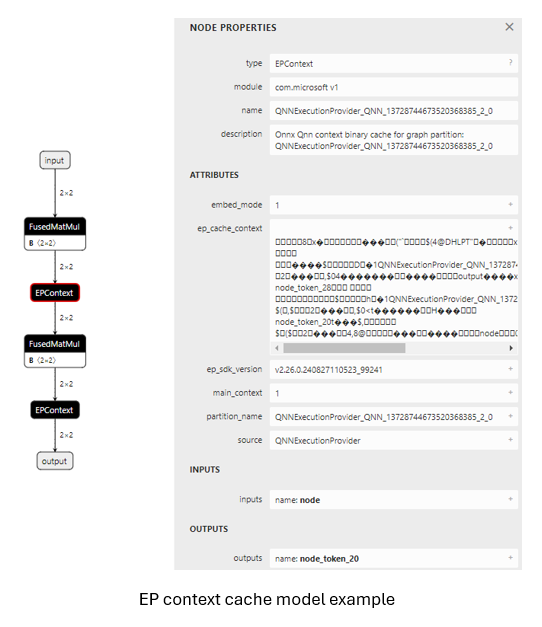
EPコンテキストキャッシュ生成と推論に関連するOnnxRuntimeセッションオプション
Section titled “EPコンテキストキャッシュ生成と推論に関連するOnnxRuntimeセッションオプション”| セッションオプション | 説明 |
|---|---|
| ep.context_enable | EPコンテキストモデル生成のみで使用。 1: ONNX Runtimeがコンテキストキャッシュモデルをダンプすることを有効にします。 0(デフォルト): コンテキストモデルダンプを無効にします。 |
| ep.context_file_path | ダンプされたモデルのファイルパスを指定します。 デフォルト: コンテキストモデル生成用の original_file_name_ctx.onnx。モデル推論の場合: ユーザーがメモリバッファからモデルを読み込み、EPコンテキストバイナリがONNXモデルの外部にある場合、このオプションを設定する必要があります。 ONNX Runtime EPはこのパスを使用してフォルダーの場所を決定し、 ep_cache_context(コンテキストバイナリパスを指す)と組み合わせてコンテキストバイナリファイルへの絶対パスを構築します。 |
| ep.context_embed_mode | コンテキストモデル生成のみで使用。 1: EPコンテキストコンテンツを直接ONNXモデルにダンプし、 ep_cache_contextノード属性内に格納します。0(デフォルト): EPコンテキストコンテンツを別ファイルにダンプし、ファイル名をONNXモデルに格納します。 ファイルパスは ep_cache_contextノード属性で追跡されます。 |
| ep.context_node_name_prefix | コンテキストモデル生成のみで使用。EPContextノード名のプレフィックスを指定します(partition_name属性と内部グラフ名としても使用)。複数の EPContextノードが単一モデルに結合される際のノード間の一意性を保証し、名前の競合を防ぎます。EPは変換されたEPコンテキストバイナリ内の** ep_graph名**にもこのプレフィックスを適用できます。 |
| session.model_external_initializers_file_folder_path | これはEPContext設計に特有ではありません。一般的に、外部データを持つモデルの場合、メモリバッファからモデルを読み込むとき、セッションはモデルの名前とパスを見失い、外部データファイルを見つけることができません。この設定を使用して外部データファイルのフォルダーパスを指定します。 すべての外部データファイルは同じフォルダー内に配置する必要があります。 |
| ep.context_model_external_initializers_file_name | コンテキストモデル生成のみで使用。 この設定は、一部のノードがCPU EPでパーティション化され、それらのノードが外部初期化子を持つ場合に使用されます。EPコンテキストモデルを生成する際、新しいモデルはソースONNXモデルが使用していた古い外部データファイルに依存すべきではありません。 外部初期化子ファイルでEPコンテキストモデルをダンプする際にこの設定を使用します。 指定された場合、すべての初期化子は外部データファイル内に配置されます。 そうでなければ、すべての初期化子は生成されたONNXファイル内に埋め込まれます。 デフォルトでは、このオプションは設定されていません。つまり、すべての初期化子はONNXファイル内に含まれます。 |
EP Context Cache Model Generation Workflow
Section titled “EP Context Cache Model Generation Workflow”EP Interface GetEpContextNodes() for Generating the EP Context Cache Model
Section titled “EP Interface GetEpContextNodes() for Generating the EP Context Cache Model”Generating the partitioned graph directly within the Execution Provider (EP) code is challenging, as the EP lacks a complete view of the entire partitioned graph. To address this, ONNX Runtime introduces a new Execution Provider interface: GetEpContextNodes().
virtual const InlinedVector<const Node*> GetEpContextNodes() const { return InlinedVector<const Node*>();}- This API returns an array of pointers to
EPContextnodes. - Execution Providers should implement this interface if they need to generate the context cache model. Otherwise, they can leave it unimplemented.
- It is the EP’s responsibility to create the
EPContextnodes along with their dependencies (e.g., the context binary file ifembed_mode = 0). - The ONNX Runtime GraphPartitioner uses this interface to retrieve the
EPContextnodes and generate the partitioned ONNX model. EP context model generation code details here
EP Context Cache Model Generation Guidelines
Section titled “EP Context Cache Model Generation Guidelines”OnnxRuntime EPs should adhere to the following guidelines to create the EP context cache model and maintain a unified user interface:
-
Ownership
- The Execution Provider (EP) is responsible for creating the EPContext node along with its dependencies.
- The ONNX Runtime framework is responsible for generating the EP context ONNX model using the
EPContextnode list provided by the EP.
-
Lifetime
- The lifetime of
EPContextnodes begins at least when the EP calls compile and ends when the EP is destroyed.
- The lifetime of
-
ep.context_enable
- ONNX Runtime creates the EP context cache model if
ep.context_enable = 1. - Otherwise, if
ep.context_enable = 0(default), ONNX Runtime follows the standard workflow without generating a cache model.
- ONNX Runtime creates the EP context cache model if
-
ep.context_file_path
- If
ep.context_file_pathis not provided, ONNX Runtime generates the output model file name by replacing.onnxin the original input model file name with_ctx.onnx. - If
ep.context_file_pathis specified, ONNX Runtime uses the provided file path. The EP should also use this path to determine the folder location for dumping the compiled EP context binary file whenep.context_embed_mode = 0. - Note:
ep.context_file_pathis required when loading the model from a memory buffer, as ONNX Runtime cannot retrieve the original model file path in this scenario.
- If
-
ep.context_embed_mode
1: Embeds the EP context content directly into the ONNX model.0(default): Dumps the EP context content into a separate file (EP context binary file).- There should be a single EP context binary, even if multiple partitioned subgraphs exist. If the EP cannot achieve this in the short term, please note it on the EP webpage. In such cases, users will need to determine the necessary files for production deployment by iterating through all primary
EPContextnodes (nodes withembed_mode=1) and extracting the file paths from the node attributeep_cache_context. - The EP context binary file name should be
[model_name]_[ep].bin. - The EP records the context binary file name in the EPContext node attribute
ep_cache_context. - The context binary file must be located in the same directory as the dumped ONNX model file.
- The file path recorded in the EPContext node is a relative path to the ONNX model file.
- Note: Subfolders are allowed.
- There should be a single EP context binary, even if multiple partitioned subgraphs exist. If the EP cannot achieve this in the short term, please note it on the EP webpage. In such cases, users will need to determine the necessary files for production deployment by iterating through all primary
-
ep.context_node_name_prefix
- If the user wants to add a custom prefix to the EPContext node name (also applied to the
partition_nameattribute and graph name), the EP should provide this capability when generating EPContext nodes. - This is useful when combining multiple EPContext nodes from different models into a single model, where there is a risk of node name or graph name conflicts across models.
- The EP should support multiple EP contexts within a single model, enabling users to merge and interconnect EPContext nodes generated from different models.
- If the user wants to add a custom prefix to the EPContext node name (also applied to the
-
Source model with external data
When the source model relies on an external data file, ONNX uses a relative path to locate that file. Therefore, the external data file must reside in the same directory as the source model. However, newly generated models should not depend on any original source files. This approach is driven by several considerations:- All newly generated files should be located in the same directory.
- There’s no guarantee that the output files will be generated in the same directory as the source files.
- The
EPContextdesign allows a model to be partitioned by multiple EPs, each compiling its ownEPContextnodes. A unified and standardized process helps avoid data duplication. - Some EPs may need to copy weights from the source into their context binaries to satisfy specific data layout requirements.
- For subgraphs that fall back to the ONNX Runtime CPU EP, all weight data will, by default, be embedded directly into the newly generated
[model_name]_ctx.onnxmodel. Ifep.context_model_external_initializers_file_nameis set, then all weight data will instead be saved to the specified external initializers file.
Usage Scenario Code Examples
Section titled “Usage Scenario Code Examples”Generate the EPContext model by creating session from model path:
    Ort::SessionOptions so;
    // Enable EPContext ONNX model dumping    so.AddConfigEntry(kOrtSessionOptionEpContextEnable, "1");
    // Add the execution provider (using QNN as an example)    so.AppendExecutionProvider("QNN", provider_options);
    // Create the session to dump the `_ctx.onnx` model    Ort::Session session1(env, "./model1.onnx", so);
Generate the EPContext model by creating session from model in memory buffer:
Similar to the C API CreateSessionFromArray, the example below creates an ONNX Runtime session from a model stored in a memory array, causing the session to lose track of the model’s name and path.
To generate the EPContext model, you must specify the file path using: ep.context_file_path.
    // Read model file into buffer array    std::vector<char> buffer;    ReadFileToBuffer("./model1.onnx", buffer);
    Ort::SessionOptions so;
    // Enable EPContext ONNX model dumping    so.AddConfigEntry(kOrtSessionOptionEpContextEnable, "1");
    // Specify the generated EPContext model file path using option ep.context_file_path    so.AddConfigEntry(kOrtSessionOptionEpContextFilePath, "./model_ctx.onnx");
    // Add the execution provider (using QNN as an example)    so.AppendExecutionProvider("QNN", provider_options);

    // Create the session to dump the `_ctx.onnx` model    Ort::Session session1(env, buffer.data(), buffer.size(), so);
Generate the EPContext model by creating session from model in memory buffer, and model has external weights:
Create the session from memory array, and the model depend on external data. The session requires session.model_external_initializers_file_folder_path to figure out the external data location, and same with previously example, ep.context_file_path to set the file path for the generated EPContext model.
    // Read model file into buffer array    std::vector<char> buffer;    ReadFileToBuffer("./model_folder/model1.onnx", buffer);
    Ort::SessionOptions so;
    // Enable EPContext ONNX model dumping    so.AddConfigEntry(kOrtSessionOptionEpContextEnable, "1");
    // Specify the generated EPContext model file path using option ep.context_file_path    so.AddConfigEntry(kOrtSessionOptionEpContextFilePath, "./model_folder/model_ctx.onnx");
    // Specify the external data folder path using option session.model_external_initializers_file_folder_path    so.AddConfigEntry(kOrtSessionOptionsModelExternalInitializersFileFolderPath, "./external_data_folder/");
    // Add the execution provider (using QNN as an example)    so.AppendExecutionProvider("QNN", provider_options);

    // Create the session to dump the `_ctx.onnx` model    Ort::Session session1(env, buffer.data(), buffer.size(), so);
Note: If there is a subgraph fallback on the CPU EP that depends on external data, the generated EPContext model should not rely on the original external data file used by the base model. By default, the EPContext model embeds all external data directly into the generated ONNX file. If you need to store weights in an external file, set ep.context_model_external_initializers_file_name. This option forces all initializers to be saved in the specified external file.
Inference Workflow for EP Context Cache Models
Section titled “Inference Workflow for EP Context Cache Models”ONNX Runtime EPs that support loading models with EPContext nodes should follow the workflow and rules below for model inference:
-
Model Identification
- The EP should first determine whether the model contains
EPContextnodes.- If no
EPContextnodes are present, the EP follows its normal inference workflow. - If the model contains
EPContextnodes:- The EP should inspect the
sourcenode attribute of allEPContextnodes to verify if any of them are intended for the current EP (i.e., thesourceattribute matches the key expected by the EP). - The EP should only partition the
EPContextnodes where thesourceattribute matches the key required by the EP. - The EP loads the cached context from the matched
EPContextnodes.
- The EP should inspect the
- If no
- The EP should first determine whether the model contains
-
Handling External Context Binaries (embed_mode = 0) When the
EPContextcache model is generated withembed_mode = 0, the context binary is stored as a separate file alongside the ONNX model in the same folder.- ONNX Runtime retrieves the relative path of the context binary file from the
ep_cache_contextattribute of theEPContextnode. - For models loaded from a file path:
- The EP should determine the folder path of the input model file and combine it with the relative path to construct the full path to the context binary file.
- For models loaded from a memory buffer:
- Since the EP cannot derive the model’s folder path, the user must specify the session option
ep.context_file_path. - The EP uses
ep.context_file_pathto determine the folder path and combines it with the relative path to construct the full path to the context binary file.
- Since the EP cannot derive the model’s folder path, the user must specify the session option
- ONNX Runtime retrieves the relative path of the context binary file from the
-
Support for Multiple Primary
EPContextNodes (main_context = 1)- The EP should support multiple primary
EPContextnodes without any limitations. - The EP must be capable of loading all EP context binary buffers/files specified in the
ep_cache_contextattributes of theEPContextnodes, deserializing them, managing theep_graphs, and selecting the appropriate one for execution.
- The EP should support multiple primary
-
Error Handling During EP Context Binary Loading
The EP or its backend SDK should be capable of detecting common failure scenarios (including but not limited to the following). In such cases, the EP should return a status with the
INVALID_GRAPHstatus code:- Detect mismatches between the driver version and the version required by the EP context binary; return an error if they are incompatible.
- Detect mismatches between the runtime SDK version and the version used to generated the EP context binary; return an error if they are incompatible.
- Return an error if loading the EP context binary fails for any reason.

Usage Scenario Code Examples
Section titled “Usage Scenario Code Examples”Create inference session from pre-compiled EPContext model:
Create the session from model file path. If there is external EP context binary file, the session can figure out the binary file path from the model file path.
    Ort::SessionOptions so;
    // Add EP, take QNN for example    so.AppendExecutionProvider("QNN", provider_options);
    // Create sessions to load from the _ctx.onnx model    Ort::Session session1(env, "model1_ctx.onnx", so);
    session1.run(...);
Create inference session from pre-compiled EPContext model in memory buffer:
Creating a session from a memory buffer of the model causes the session to lose track of the model’s name and path. To resolve this, you must set: ep.context_file_path.
- The session uses this path to identify the folder location.
- With the EP context binary file name from the
EPContextnode, the session constructs the full path to the final EP context binary file.
    // Read model file into buffer array    std::vector<char> buffer;    ReadFileToBuffer("./model_folder/model_ctx.onnx", buffer);
    Ort::SessionOptions so;
    // Specify the EPContext model file path using option ep.context_file_path    so.AddConfigEntry(kOrtSessionOptionEpContextFilePath, "./model_path/model_ctx.onnx");
    // Add EP, take QNN for example    so.AppendExecutionProvider("QNN", provider_options);
    // Create sessions to load from the buffer    Ort::Session session1(env, buffer.data(), buffer.size(), so);
    session1.run(...);
EPContext with Weight Sharing
Section titled “EPContext with Weight Sharing”Weight Sharing in Onnx Domain
Section titled “Weight Sharing in Onnx Domain”In ONNX, weight sharing refers to multiple ONNX models with external weights pointing to the same external weight file. These models use the same tensor names, allowing them to reference the same tensor data.

Weight Sharing in EP Domain with EPContext
Section titled “Weight Sharing in EP Domain with EPContext”EP weight sharing is enabled using a pre-generated EP context binary/blob. To do this, users must generate the context binary offline (Ahead Of Time).
- Some EPs require specific platforms, such as Linux x86_64 and/or Windows x86_64. Please refer to the specific EP page for details.
- The EP context binary contains multiple graphs that share the same tensors.

The EP or backend SDK should be capable of converting and compiling the graph as described above.
- The EP or SDK should identify identical weights from the existing EP context generated by previously compiled graphs.
- When new graphs are compiled into the EP context, they should reuse existing weights if they are recognized as identical.
For example, in
[model_name]_[ep].bin,tensor1_1fromep_graph1andtensor2_1fromep_graph2are identical and both point to the same data offset,tensor_data1.
EPContext Model Generation with Weight Sharing Workflow
Section titled “EPContext Model Generation with Weight Sharing Workflow”
Each ONNX Runtime session is associated with an ONNX model. Models that share weights are grouped into a model group, while ONNX Runtime sessions with common properties are organized into a session group. ONNX Runtime introduces two session options: ep.share_ep_contexts and ep.stop_share_ep_contexts to facilitate session grouping.
- All ONNX Runtime sessions within the session group should have
ep.share_ep_contextsenabled. - The final ONNX Runtime session uses
ep.stop_share_ep_contextsto indicate that it is the last session in the group. Note: A single ONNX model may contain multipleEPContextnodes, depending on the graph partitioning result. However, for simplicity, each model is shown with only oneEPcontextnode here.
Implementation Guidelines for EPContext Model Generation with Weight Sharing
Section titled “Implementation Guidelines for EPContext Model Generation with Weight Sharing”- Shared Workspace Creation:
The first session creates a shared workspace (e.g., EP Singleton) to share resources with other sessions. - EP Context Binary File Naming:
The EP context binary file name is determined by the first session and stored in the shared workspace (e.g., EP Singleton) for use across session groups.
The EP context binary file name should be[model1_name]_[ep].bin. - Graph Compilation:
All sessions in the session group compile their graphs into the shared resource. EPContextModel Generation:
Each session in the session group creates anEPContextONNX model. The EP generates anEPContextnode that references the EP context binary file name. The ONNX Runtime framework then dumps theEPContextONNX model.- Final EP Context Binary File Generation:
The last session (the one withep.stop_share_ep_contextsenabled) in the session group generates the final EP context binary file using the name stored in the shared workspace. - Shared Workspace Cleanup:
The last session clears the shared workspace. An empty shared workspace indicates that the next session to run is the first session. - Number of Files Generated:
For N source models that share weights, a total of N+1 files should be generated.
The generated files aremodel1_ctx.onnx,...,modeln_ctx.onnx,[model1_name]_[ep].bin.
User Code Example
Section titled “User Code Example” Ort::SessionOptions so;
// Enable EPContext ONNX model dumping so.AddConfigEntry(kOrtSessionOptionEpContextEnable, "1");
// Enable EP context sharing across sessions so.AddConfigEntry(kOrtSessionOptionShareEpContexts, "1");
// Add the execution provider (using QNN as an example) so.AppendExecutionProvider("QNN", provider_options);
// Create the first session to dump the model1_ctx.onnx file Ort::Session session1(env, "model1.onnx", so);
// Mark the last session by enabling ep.stop_share_ep_contexts so.AddConfigEntry(kOrtSessionOptionStopShareEpContexts, "1");
// Create the last session to dump the model2_ctx.onnx file and generate the [model1_name]_[ep].bin Ort::Session session2(env, "model2.onnx", so);General Tool for EPContext Model Generation with Weight Sharing
Section titled “General Tool for EPContext Model Generation with Weight Sharing”OnnxRuntime provides the ep_weight_sharing_ctx_gen tool to automate the weight-sharing workflow. This tool handles the entire process. This tool is specifically designed for weight sharing scenarios, streamlining the EPContext model generation process.
Example command line:
./ep_weight_sharing_ctx_gen -e qnn -i "soc_model|60 htp_graph_finalization_optimization_mode|3" ./model1.onnx,./model2.onnxIt creates two Onnx models (model1_ctx.onnx, model2_ctx.onnx) and one QNN context binary file ([model1_name]_[ep].bin).
Inference Sessions from EPContext Models with Weight Sharing
Section titled “Inference Sessions from EPContext Models with Weight Sharing”To use the dumped EPContext models with weight sharing enabled, ONNX Runtime inference sessions must have resource sharing activated. This is done by setting the session option:
ep.share_ep_contexts = 1Implementation Guidelines for Inferencing from EPContext Models with Weight Sharing
Section titled “Implementation Guidelines for Inferencing from EPContext Models with Weight Sharing”- Create the first OnnxRuntime inference session
- Set session option:
ep.share_ep_contexts=1. - Load the
model1_ctx.onnxmodel. - The shared workspace is initially empty.
- The EP loads
[model1_name]_[ep].binand deserializes the binary to retrieve all graphs (e.g.,ep_graph1,ep_graph2). - The
EPContextnode in model1_ctx.onnx specifies the use ofep_graph1. - The session uses
ep_graph1for inference. - The remaining graphs (
ep_graph2) are placed into the shared workspace for future sessions.
- Set session option:
- Create the Second ONNX Runtime Inference Session
- Set session option:
ep.share_ep_contexts=1. - Load the
model2_ctx.onnxmodel. - The
EPContextnode inmodel2_ctx.onnxspecifies the use ofep_graph2. - The shared workspace already contains
ep_graph2. - The EP skips loading
[model1_name]_[ep].binsince the required graph is already available in the shared workspace. - The session moves
ep_graph2from the shared workspace to the current session, making it no longer accessible from the shared workspace.
- Set session option:
- Session Cleanup Best Practices
- To avoid issues during concurrent execution, it is recommended to destroy the sessions in reverse order (i.e., destroy the second session before the first session).
- This ensures proper resource management and prevents potential conflicts with shared resources.
User Code Example
Section titled “User Code Example” Ort::SessionOptions so; // enable ep.share_ep_contexts so.AddConfigEntry(kOrtSessionOptionShareEpContexts, "1");
// Add EP, take QNN for example so.AppendExecutionProvider("QNN", provider_options);
// Create sessions to load from the _ctx.onnx models with resource sharing enabled Ort::Session session1(env, "model1_ctx.onnx", so); Ort::Session session2(env, "model2_ctx.onnx", so);
session1.run(...); session2.run(...);